Webex
- 4.1
- Rating
- 10.00M
- Installs
- Free
- Price

 Analysis by App-foxy
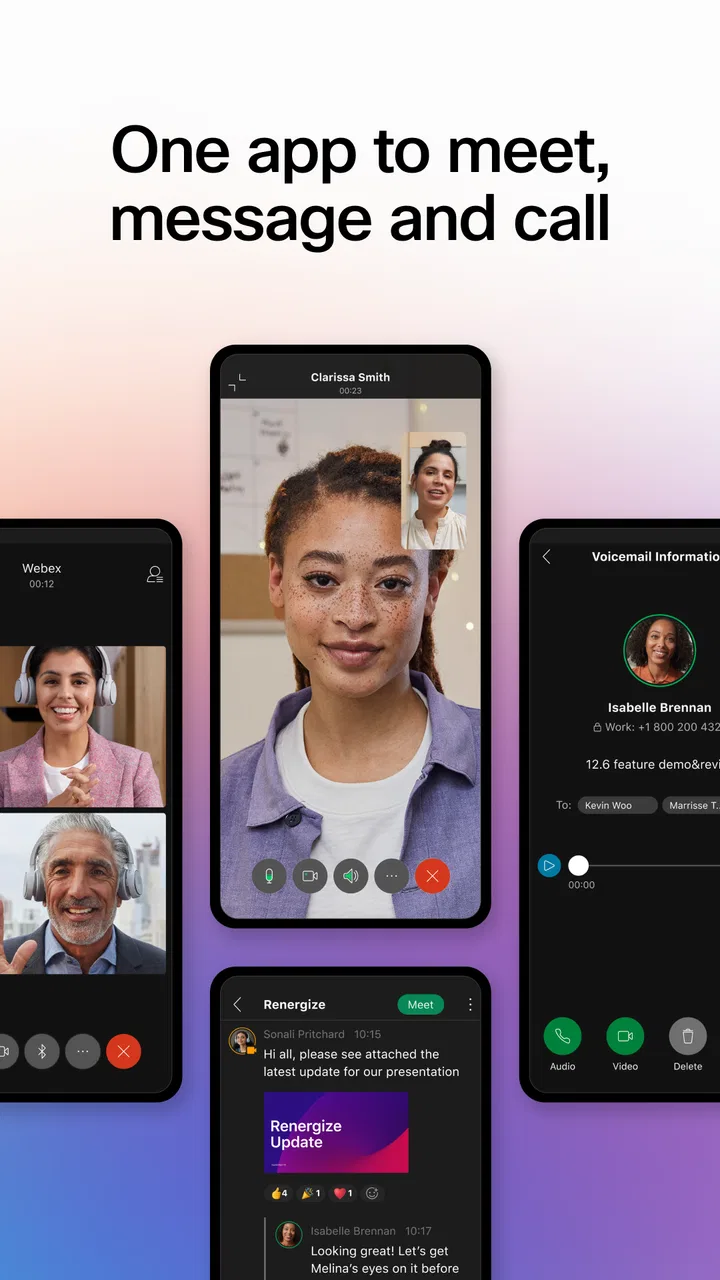
I first noticed Webex in the kind of situation where a collaboration app earns its place quickly: a work conversation that cannot wait for everyone to be in the same room. Cisco Systems, Inc. positions it as a business app, but what matters in daily use is how it brings meetings, messages, and shared work into one place instead of scattering them across several tools. I found the experience most useful when my day moved between a desk, a phone, and other people’s schedules.
The app is free to download, carries an Everyone age rating, and has been available since September 12, 2014. Its scale is easy to understand from the store presence: Webex has passed 10 million installs, with an average rating of 4.3 from roughly 30 thousand ratings. That does not automatically make it the right choice for every team, but it does suggest that it has become a familiar option for people who need business communication on mobile devices.
My overall impression is that Webex works best when I treat it as a connected workspace rather than simply a video meeting button. The quality of that experience depends heavily on the network, the way a team organizes conversations, and whether everyone is comfortable using one central service. When those conditions are right, it feels practical and focused. When they are not, the app can make a simple task feel more complicated than a phone call or a lightweight chat service.
You May Also Like

 Blood Strike: 2.5 Anniversary
Blood Strike’s Loadouts Turn Every Drop Into a Tactical Gamble
A close look at Blood Strike’s custom loadouts: how fast access to signature weapons reshapes its battle royale rhythm, rewards preparation, and narrows the gap between fights.

 Pandora - Music & Podcasts
Pandora’s Music Is Easy to Start, but Harder to Recover
Pandora’s strength is its low-effort path from a seed to a station. Its weak spot is how much confidence it asks you to place in connection, setup, and quiet recovery.

 8 Ball Pool
8 Ball Pool Is Built on Rivalries, Rematches, and Routine
A close look at the rivalries, rematches, shared routines, and unanswered safety questions that turn a quick pool match into a persistent mobile community.

 Samsung Music
Samsung Music’s Quiet Strength Is Playing What You Already Own
Its reach comes less from spectacle than from dependable access to a personal library. That simplicity is both the app’s strongest retention engine and its ceiling.

 AccuWeather: Weather Radar
AccuWeather Review: A Quick, Clear Forecast for Everyday Decisions
For everyday plans, the best forecast is the one you can understand quickly. AccuWeather makes rain timing, radar, and local conditions easy to act on, with a few trade-offs.

 Hill Climb Racing
Why Hill Climb Racing Still Turns Crashes Into One More Run
A tiny car, a bumpy hill and one more upgrade: Hill Climb Racing keeps resurfacing because its simple chaos makes every near-miss feel personal.
More From Our News Desk
View All News


How Webex behaves when the network is doing the real work
When I judge Webex in a real workday, I focus on what happens once people leave a steady connection: whether they can still follow the conversation, make a useful handoff, and keep a decision from getting lost. That makes network quality only part of the story; the team’s habits matter just as much. Next, I look at how a mobile session changes the way I manage attention and information.
Meetings are only as dependable as the connection around them
Webex naturally becomes most demanding during live meetings. Voice, video, screen sharing, and the movement of participants all rely on a stable connection, so the app’s usefulness changes immediately when the network becomes weak. In a strong Wi-Fi environment, I can concentrate on the conversation instead of thinking about the technology. On a crowded network, the experience becomes more cautious: I pay attention to whether video is necessary, whether audio is clear, and whether the meeting is still worth joining from the current location.
That network dependence is not a flaw unique to Webex, but it is important when comparing it with ordinary business messaging. A text conversation can often tolerate pauses and interruptions. A live meeting cannot. If I am joining a short status call from a busy place, I would rather protect the audio than insist on using every visual element. This makes Webex more flexible than a basic conference call, but it also asks me to make sensible choices before and during the meeting.
A useful habit is to join early enough to check the environment, especially for an important client conversation or an internal presentation. I can choose a quieter location, close unrelated activity, and avoid treating a mobile connection as if it were identical to a reliable office network. The app does not remove those practical responsibilities. It gives me a central place to communicate, but the surrounding conditions still shape the result.
Messages and shared work feel less fragile than live calls
The connected workspace idea becomes more convincing outside the meeting itself. When I need to send a question, follow up on a decision, or keep a work thread moving, asynchronous communication is less sensitive to a brief interruption than a live conversation. I do not have to solve every issue in real time, and that can make the app feel more useful during a fragmented workday.
This is one of the less obvious strengths of using Webex as a single work destination. A meeting can create a decision, while the surrounding conversation gives that decision a place to be remembered and revisited. I found that distinction valuable because many teams lose time not during the meeting, but afterward, when people are unsure where the final answer was written. Webex is more helpful when the team agrees to keep decisions in the relevant conversation rather than leaving them in private messages or scattered email threads.
There is a trade-off, though. Bringing several communication modes together can make the app feel busy to a new user. A person who only wants to attend occasional meetings may not immediately understand where to look for ongoing discussions or how the team has arranged its spaces. I would not call that a reason to avoid the app, but I would encourage a team to establish simple naming and posting habits before expecting everyone to find information naturally.
What changes when I use it away from my desk
On a phone, Webex is most convincing for short, purposeful actions. I can check a conversation, respond to a work question, join a scheduled discussion, or review the context before speaking. Those tasks fit mobile use better than trying to manage a large project entirely from a small screen. The app extends the workday’s communication rather than replacing the comfort of a full desktop setup.
I would be careful about using it for long meetings while walking, commuting, or moving through places with inconsistent reception. Even when the app remains open, my attention is divided, and the network may change as I move. A mobile meeting can be convenient, but convenience is not the same as reliability. For a presentation, detailed review, or sensitive discussion, I prefer a quiet stationary location with dependable connectivity.
The phone experience is especially useful in a realistic handoff scenario. Imagine that I leave my desk for another part of the building just before a colleague asks for clarification. Instead of waiting until I return, I can read the message and answer while the context is still fresh. If the question turns into a meeting, I can join from the phone, but I would switch to a more stable setup when the discussion becomes detailed or requires sustained attention.
Small-screen communication needs a different rhythm
Mobile collaboration also changes how much information I can comfortably process. On a computer, it is easier to compare a conversation with another document or keep several windows visible. On a phone, I have to move between views, remember more context, and make fewer assumptions about what is currently on screen. I therefore use the mobile app for triage: identify what needs an immediate response, save deeper work for a more suitable setting, and avoid making a complicated decision from a hurried glance.
That approach helps prevent a common mistake with business apps: confusing access with productivity. Webex can keep me connected, but it cannot make a rushed reply thoughtful. I get better results when I use the phone to preserve momentum and the larger workspace to handle work that needs comparison, editing, or careful review.
When a connection fails, the human workflow matters
Every meeting platform eventually encounters a weak signal, an unstable network, or a device that needs attention. My practical advice is to separate the communication goal from the preferred format. If video becomes unreliable, audio may be the priority. If a live discussion stops being productive, a concise message can preserve the next step. The important thing is not to keep fighting the connection without deciding what information must still reach the team.
Webex is most useful in these moments when the group already knows where to continue the conversation. A meeting can fail technically while the work still succeeds if someone records the decision in the appropriate team conversation and identifies who owns the follow-up. That is a workflow improvement, not a magical recovery feature, and it depends on team discipline. Still, the app’s combination of live and asynchronous communication makes that recovery path more natural than relying on a meeting alone.
I also recommend keeping a short backup plan for important calls. That might mean knowing which person will send the key points, deciding how to reconnect, or agreeing that urgent facts should be written into the team conversation. This is particularly important when participants are spread across different locations. The app can reconnect people, but a clear fallback prevents a temporary network problem from becoming a missed decision.
Connectivity problems can expose unclear team habits
One insight I took from using Webex is that technical friction often reveals an organizational problem. If nobody knows where a decision belongs after a disrupted meeting, the issue is not only the connection. If every participant depends on one person to remember the outcome, the team has created a communication bottleneck. Webex gives a team enough room to create a better routine, but it does not create that routine automatically.
I would set expectations early: use meetings for discussion, use the relevant conversation for decisions and follow-up, and avoid opening several parallel threads for the same subject. That simple rule reduces the amount of searching needed when someone reconnects late or misses part of a call. It also helps new members understand how the team uses the app instead of forcing them to guess.
Using Webex without treating mobile data as unlimited
Video is usually the first part of a collaboration session I would reconsider when using mobile data. A live camera view is valuable for introductions, presentations, and conversations where visual presence matters. It is less essential for a short voice update or a meeting where one person is sharing information. Choosing audio when appropriate is a practical way to reduce pressure on the connection and avoid wasting data during routine calls.
I would also avoid joining a long meeting from mobile data simply because the phone makes it possible. The app’s convenience can encourage accidental overuse, especially when a meeting continues beyond its useful point. Before joining, I ask whether I need to participate live, whether audio is enough, and whether I can move to Wi-Fi. Those questions are simple, but they make the mobile experience more predictable.
Data-conscious use is also about attention. A phone can keep me reachable, yet constant alerts and rapidly changing conversations can make the workday feel noisy. I get more value when I check Webex with a purpose: answer a time-sensitive question, prepare for a meeting, or review an assigned follow-up. Teams that define which messages deserve immediate attention make the app easier to live with.
Compared with email, Webex feels better suited to conversations that need a quick exchange and visible participation from a group. Compared with a basic chat app, it is more clearly shaped around business collaboration and scheduled meetings. Compared with a dedicated video meeting tool, its broader communication model can reduce the need to switch services, but that breadth may feel unnecessary for a small team that only needs occasional calls.
Who should choose Webex, and who should skip it
I would recommend Webex to a distributed team that wants meetings and work conversations to sit close together. It is also a sensible fit for people who move between desktop and mobile contexts and need to remain involved without being tied to one physical office. Cisco Systems, Inc. gives the app a recognizable business identity, and its long presence makes it feel like a serious option rather than a temporary communication experiment.
I would be more hesitant to recommend it to someone who only needs a very simple one-to-one chat, or to a small group that already has a lighter tool everyone understands. Adding a full collaboration environment can create unnecessary setup and notification management when the real need is just a quick exchange. It may also frustrate users who expect every meeting to work equally well from any location, because network quality and device context still matter.
Cost is another part of the decision. The app itself is free, while in-app purchases range from $14.49 to $143.99 per item. That makes it easy to try, but teams should still examine which paid capabilities they actually need before building their whole workflow around them. I would start with the free experience, test it with real meetings and follow-ups, and only then decide whether additional spending is justified for the way the team works.
My practical routine for getting more from it
My preferred workflow is deliberately simple. Before a meeting, I check the network and decide whether the phone is genuinely suitable. During the meeting, I protect clear audio and avoid using video merely out of habit. Afterward, I place the decision and next action in the relevant conversation. If the meeting fails, I use that same location to explain what happened and identify the next step.
For mobile use, I keep the app focused on short responses and meeting access. I do not treat a phone as a full substitute for a larger workspace when the task involves several documents or a long presentation. I also avoid leaving every conversation equally urgent. These choices do more to improve the experience than simply installing the app and expecting its features to organize a team by themselves.
Another useful tip is to distinguish between a connectivity problem and a content problem. If the audio is clear but the discussion is wandering, changing networks will not help. If the conversation is focused but voices keep breaking up, the team should address the connection rather than repeat the same explanation. That distinction saves time and prevents Webex from being blamed for issues that belong to meeting design or team coordination.
My connectivity verdict
After using it as a business communication tool, I see Webex as a strong choice for teams that value continuity between live meetings and ongoing conversations. Its biggest advantage is not simply that it lets people meet; it gives a team a place to continue working when a meeting ends, a participant joins from a phone, or a connection interrupts the original plan.
That advantage comes with conditions. Webex cannot make an unstable network dependable, and mobile access does not remove the limits of a small screen, divided attention, or limited data. Users who understand those boundaries will get a more reliable experience than users who expect the app to solve every communication problem automatically.
For me, the deciding question is whether a team wants one connected business environment and is willing to agree on how to use it. If the answer is yes, Webex is worth trying as a practical collaboration hub, especially for people who move between meetings, messages, and mobile work. If the need is only a bare-bones chat or an occasional call, a simpler alternative may be easier. The app earns my recommendation not because it eliminates friction, but because it gives organized teams a sensible way to keep communication moving when locations and connections keep changing.
FAQs for Webex
01What is Webex and how does it work?
Webex is a comprehensive video conferencing and collaboration app that allows users to host and join meetings, share screens, and collaborate in real-time. It's designed for both personal and professional use, providing features like chat, file sharing, and integration with other productivity tools. Once installed, users can easily schedule and join meetings from their Android or iOS devices.
02Is Webex free to use?
Yes, Webex offers a free plan with basic features suitable for personal use, including hosting meetings with up to 100 participants for a limited duration. However, for more advanced features such as longer meeting times, larger participant capacity, and additional administrative controls, users need to subscribe to one of the paid plans.
03What are the system requirements for using Webex on mobile devices?
Webex is compatible with most Android and iOS devices. For Android, it requires version 5.0 or later, and for iOS, it requires version 11.0 or later. Ensure your device has a stable internet connection, sufficient storage, and up-to-date software to optimize performance and access all features seamlessly.
04How secure is Webex for hosting meetings?
Webex prioritizes security with end-to-end encryption, strong password protection, and options for waiting rooms and locked meetings. These features help ensure that only invited participants can join. Cisco, the parent company, continually updates security protocols to protect user data and privacy, making it a reliable choice for sensitive communications.
05Can Webex integrate with other productivity tools?
Yes, Webex offers integration with various productivity tools such as Microsoft Office 365, Google Workspace, and Slack. These integrations enable seamless scheduling, sharing, and collaboration, enhancing workflow efficiency. Users can easily connect Webex with these platforms to streamline communication and maximize productivity.
Pros
- High-quality video and audio clarity.
- Strong integration with productivity tools.
- User-friendly interface for all ages.
- Secure with end-to-end encryption.
- Supports large meetings seamlessly.
Cons
- Occasional connectivity issues.
- Can be resource-intensive on devices.
- Limited features in free version.
- Some features need additional plugins.
- Higher learning curve for beginners.

Webex
Gallery